
Inspect cell
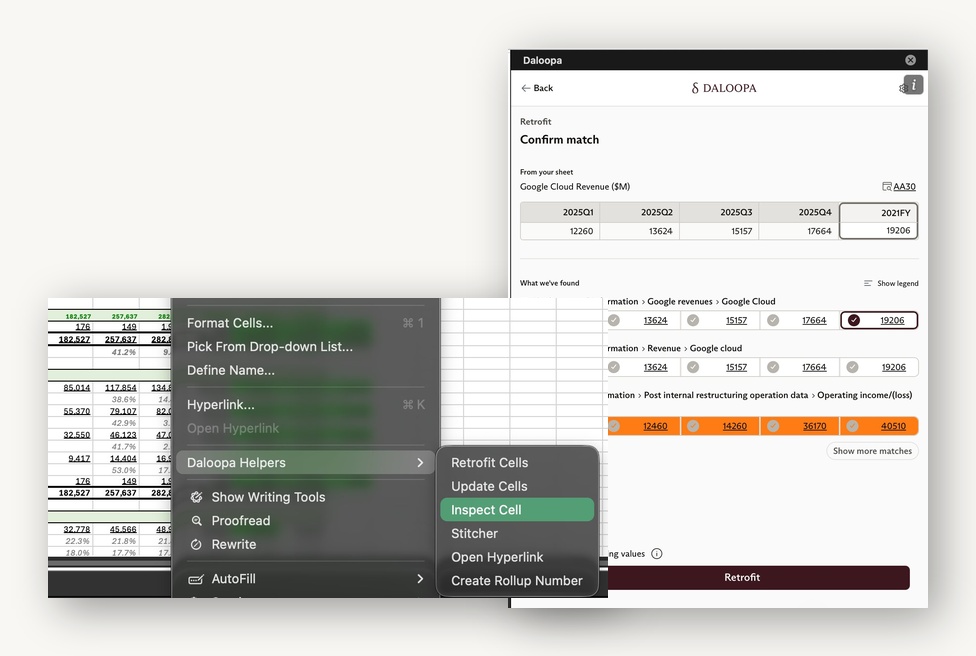
Inspect Cell compares your model's inputs to Daloopa's database. It matches both the numbers and the row labels for similarity and shows the closest data items, each linked straight to its source filing so you can trace it to source and connect it to your model.
Inspect Cell opens from the right-click context menu in the sheet. It isn't a standalone action on the Home screen of the Daloopa Add-In.
When to use it
Inspect shows where your model differs from what a company reported. It helps in three cases:
- Rounded numbers. A rounded number in a different unit still matches. For example, your model shows
2,115.9and the reported figure is2,115,907; Inspect surfaces the match because the similarity is high. - Missing data. With one quarter of correct data and a row title close to the company's, mapping is quick.
- Wrong data. Inspect flags any difference between your model and the filings.
Once the right match appears, click Retrofit to add source links to your model.
Overwriting cells
When you connect a cell, you choose whether to replace your number or keep it. To correct a value that differs from the filings, overwrite it with the Inspect value. To keep your own number — for example, one that carries an adjustment — while still adding the source link for future updates, select Don't overwrite my numbers when retrofitting.
Updated about 2 months ago