
Skills
Skills are specialized prompts that give a LLM instructions to run an analysis. Daloopa's Skills allow you to run slash command with a ticker, and get back a fully cited report — every number links to the underlying SEC filing in Daloopa. For example, /earnings AAPL pulls 8 quarters of financials, segments, KPIs, guidance vs. actuals, cost structure, and read-throughs to adjacent companies. What would take hours of pulling data and building spreadsheets takes minutes.
There are four ways to access skills:
- Agent-initiated skills (new): The MCP server exposes two discovery tools that let an agent find and run skills on its own. This means a skill no longer has to be manually selected. LLM inspects the catalog, picks the skill whose description matches the request, asks only for any required inputs it doesn't already have, and runs it. Daloopa MCP provides two new tools for this workflow:
list_skills— lists every available skill with its slug, title, description, and required inputs. An agent calls this first when a user asks for a structured deliverable ("do an earnings review of AAPL", "build me a DCF").get_skill— fetches a single skill's full instructions with the user's inputs substituted in, ready to execute.
- Claude.ai: Once the Daloopa MCP server is connected, you can select any skill straight from the chat. Click the + icon to the left of the input box, then choose Connectors, hover Add from Daloopa to expand the skill list. Select a skill (e.g. Earnings review, Tearsheet, Bull bear, Dcf, Comps, …). Finally, a popup opens where you type the skill's inputs (ticker, peers, etc.), then run it.
- Claude Plugin: A lightweight add-on for Claude Code or Claude Cowork. Installs all 21 skills with no dependencies. Skills are prefixed with
daloopa:(e.g.,/daloopa:earnings-review AAPL). - Codex / ChatGPT Plugin: The same 21 skills packaged for the Codex plugin workflow and as uploadable ChatGPT skill zips. Requires Daloopa MCP/tool access in the target workspace.
- Starter Kit: A full repo you clone and open in Claude Code, with enhanced infrastructure and application code on top of the skills. Requires Python.
Skills
The Claude plugin and the Codex/ChatGPT plugin both ship all 21 skills. Most produce a self-contained HTML report shown in the conversation; a handful generate downloadable Word/Excel deliverables.
Analysis Skills (HTML report)
| Skill | What You Get |
|---|---|
/earnings-review TICKER | Quarterly deep dive — financials, margins, segments, KPIs, guidance vs. actuals, cost structure, read-throughs |
/earnings-prep TICKER | Pre-earnings preparation report for the night before a company reports |
/earnings-flash TICKER | Rapid first-read earnings flash |
/tearsheet TICKER | One-page snapshot — key metrics, tensions, news, what to watch |
/bull-bear TICKER | Bull/base/bear scenarios with segment builds and implied valuations |
/guidance-tracker TICKER | Management guidance accuracy — beat/miss patterns, credibility score |
/dcf TICKER | KPI-driven DCF with WACC and sensitivity table |
/comps TICKER | Peer multiples, implied valuation, premium/discount analysis |
/precedent-transactions TICKER | Precedent M&A transactions with deal multiples and acquisition history |
/industry TICKER1 TICKER2 ... | Side-by-side financials, margins, growth, and KPIs across companies |
/inflection TICKER | Auto-detects biggest accelerations and decelerations across all metrics |
/capital-allocation TICKER | Buybacks, dividends, leverage, reinvestment assessment |
/supply-chain TICKER | Interactive supplier/customer map with shock analysis |
/unit-economics TICKER | Bottoms-up unit economics decomposition |
/working-capital TICKER | Cash conversion cycle, earnings quality, and working capital deep dive |
/ib-deck TICKER | Institutional-grade investment banking pitch deck (HTML) |
Deliverable Skills (Word / Excel)
| Skill | Output |
|---|---|
/research-note TICKER | .docx — Full research note with thesis, valuation, risks |
/build-model TICKER | .xlsx — Multi-tab financial model with formulas and projections |
/comp-sheet TICKER | .xlsx — Industry comp sheet across peers with operational KPIs |
/initiate TICKER | .docx + .xlsx — Coverage initiation note and model in one pass |
/setup is also available in every distribution — it verifies the Daloopa MCP connection and lists available skills.
How to Access
Option 1: Agent-initiated tools (any MCP client)
The Daloopa MCP server exposes two discovery tools — list_skills and get_skill — that let an LLM find and run skills on its own. Nothing to attach, nothing to pre-select: just describe what you want in natural language (e.g. "do an earnings review of AAPL", "build me a DCF for NVDA"). The agent inspects the catalog, picks the skill whose description matches your request, asks only for any required inputs it doesn't already have, and runs it.
Because this works over the Model Context Protocol, it's available everywhere the Daloopa MCP server is connected — not just Claude. Any MCP-capable client can discover and run skills the same way: Claude.ai, ChatGPT, Claude Code, Claude Cowork, Cursor, Microsoft 365 Copilot, and your own custom agents.
-
list_skills— lists every available skill with its slug, title, description, and required inputs. The agent calls this first when you ask for a structured deliverable. -
get_skill— fetches a single skill's full instructions with your inputs substituted in, ready to execute.
Connect once and you're set: -
Claude.ai: Settings > Connectors > Daloopa > Connect
-
Other clients: add the Daloopa MCP server in the client's connector/tool settings.
Option 2: Claude.ai — pick a skill manually (via our MCP Server)
Prefer to choose the exact skill yourself? Once the Daloopa MCP server is connected, you can select any skill straight from the composer:
- Click the + icon to the left of the input box.
- Choose Connectors.
- Hover Add from Daloopa to expand the skill list.
- Select a skill (e.g. Earnings review, Tearsheet, Bull bear, Dcf, Comps, …).
- A popup opens where you type the skill's inputs (ticker, peers, etc.), then run it.
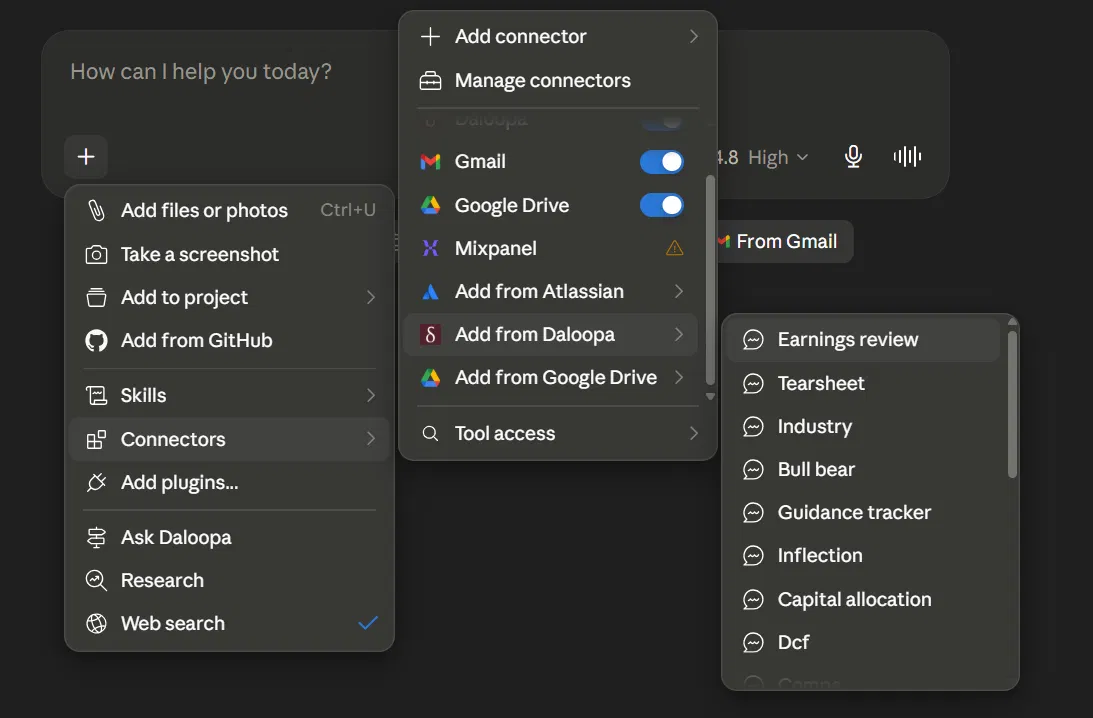
How to manually add a skill via claude.ai chat
- Claude.ai: Settings > Connectors > Daloopa > Connect (if you haven't already)
Option 3: Claude Plugin (Claude Code CLI | GUI or Claude Cowork GUI)
Adds all 21 skills to any Claude Code or Claude Cowork project. No dependencies.
Claude Code CLI
# 1. Add the marketplace
claude plugin marketplace add daloopa/daloopa-plugin-claude

# 2. Install the plugin
claude plugin install daloopa

# 3. Verify the connection
/daloopa:setup
Then run skills with the daloopa: prefix: /daloopa:earnings-review AAPL
Claude Code / Claude Cowork GUI
Click the + icon to the left of the input prompt and choose Add plugin. Go to Personal, click +, choose Add marketplace from GitHub, and add daloopa/daloopa-plugin-claude. This gives you access to all 21 skills (e.g., /daloopa:earnings-review AAPL).
Option 4: Codex / ChatGPT Plugin (Codex | ChatGPT)
The same 21 skills packaged for Codex and ChatGPT. Requires Daloopa MCP/tool access enabled in the target workspace.
- Codex: add the repo through the local Codex plugin workflow (public plugin name
daloopa), then prompt naturally — e.g. "Review MSFT earnings and guidance." - ChatGPT: build uploadable skill packages with
python3 scripts/package_chatgpt_skills.py; one zip per skill is written todist/chatgpt-skills/.
Option 5: Starter Kit (Claude Code)
Full repo with the skills plus enhanced infrastructure and application code. Requires Python.
git clone https://github.com/daloopa/investing.git && cd investing
pip3 install -r requirements.txt
claude
/setup
Updated 4 months ago